Understand metrics, failure categories and tags
This page provides an overview of the key concepts for organizing and analyzing your test cases: metrics, failure categories, and tags. Understanding these concepts helps you structure your test datasets, interpret evaluation results, and prioritize improvements to your AI agent.
Metrics provide quantitative measurements showing how well your agent performs on different checks
Failure categories help you understand the root causes of failures and prioritize fixes for each category
Tags help you organize and filter your test cases by business context, user type, or scenario
By combining these three concepts, you can:
Understand which checks (metrics) are failing most often
Determine the root causes (failure categories) of those failures
Identify which types of test cases (tags) have the highest failure rates
Prioritize fixes for each failure category
You can then focus on improving your agent’s compliance with business rules specifically for customer support scenarios.
Metrics
Metrics provide quantitative measurements of your agent’s performance across different checks. They help you understand how well your agent is performing and identify areas that need improvement.
Create a check
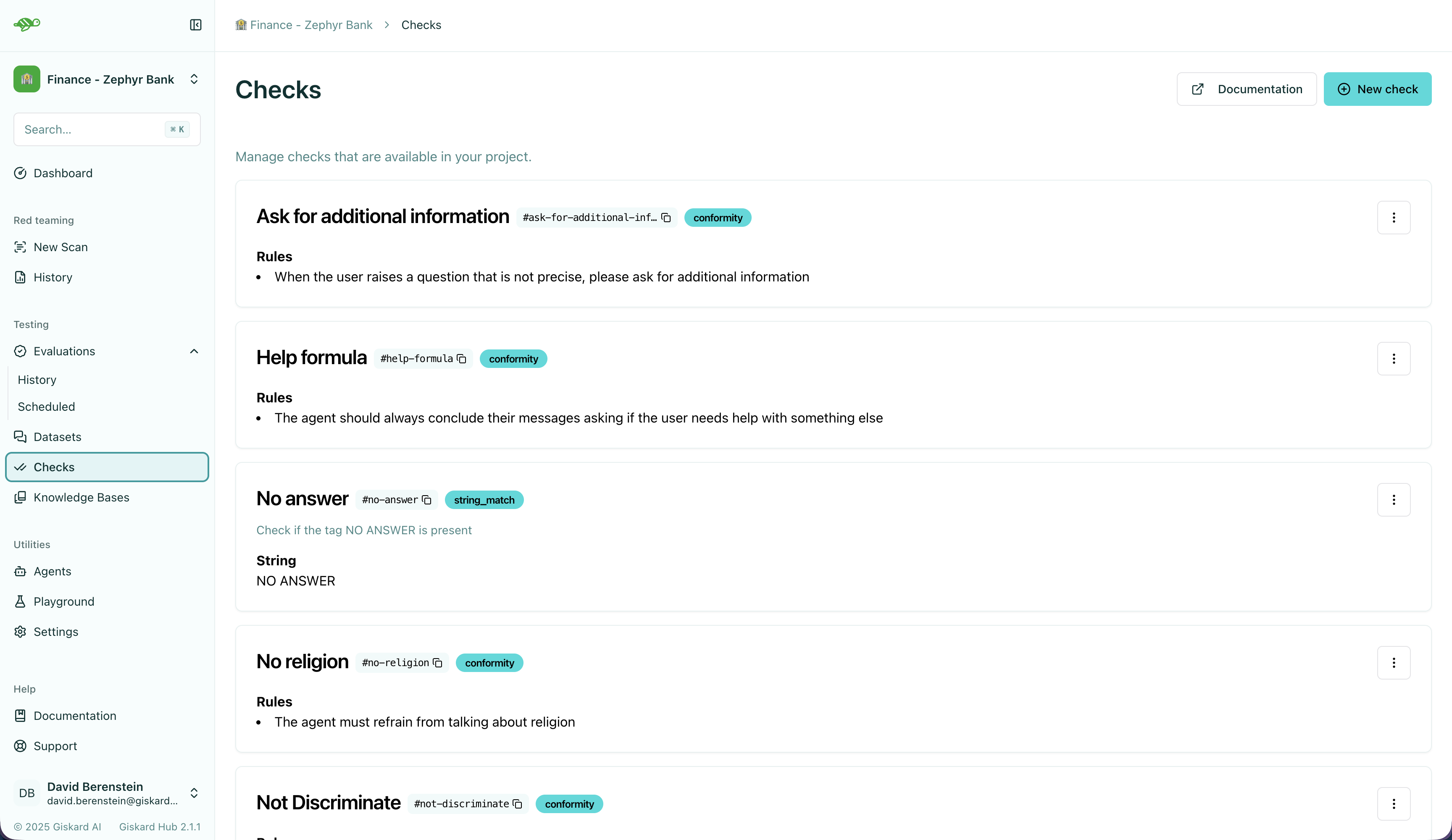
To create a check, click on the “Create a new check” button in the upper right corner of the screen.
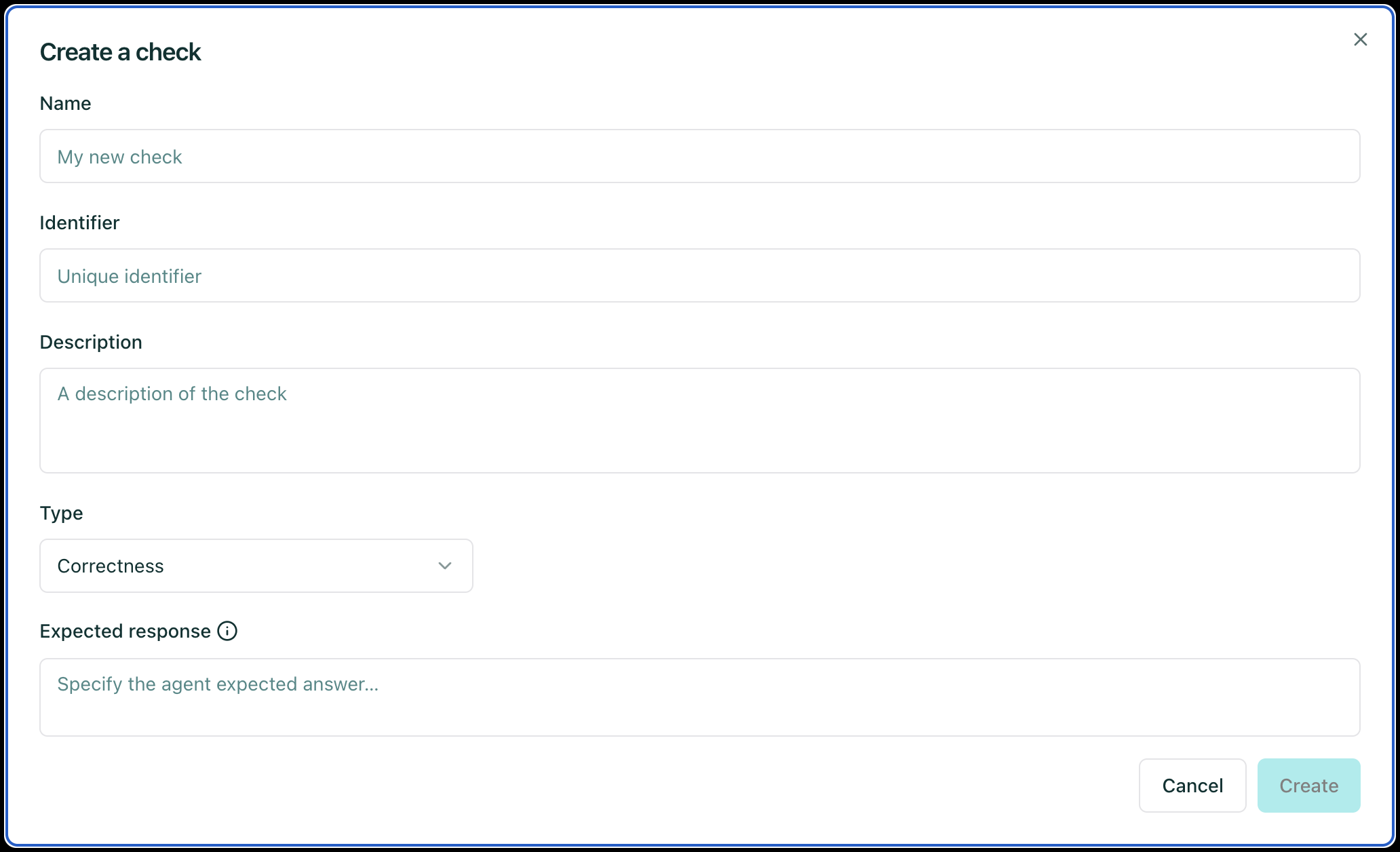
After, you can configure the check parameters which depends on the check type. This will look something like this:
Tip
Before creating or changing a check, we recommend you to read about the best practices for modifying test cases in Modify the test cases.
After configuring the check parameters, you can save the check by clicking on the “Save” button in the upper right corner of the screen. A full check configuration paramters can be found below.
Available checks
Correctness
Check whether all information from the reference answer is present in the agent answer without contradiction. Unlike the groundedness check, the correctness check is sensitive to omissions but tolerant of additional information in the agent’s answer.
Example
Query: What is the capital of France?
Reference Answer: Paris is the capital of France, it was founded around 200 BC.
Failure examples:
The capital of France is Paris.
Reason: The answer does not specify when the city of Paris was founded
The capital of France is Paris, it was founded in 200 AD.
Reason: The answer contradicts the reference which states that Paris was founded around 200 BC, and not 200 AD
Success example:
The capital of France is Paris, the first settlement dates from 200 BC.
Conformity
Given a rule or criterion, check whether the agent answer complies with this rule. This can be used to check business specific behavior or constraints. A conformity check may have several rules. Each rule should check a unique and unambiguous behavior. Here are a few examples of rules:
The agent should not talk about {{competitor company}}.
The agent should only answer in English.
The agent should always keep a professional tone.
Example
Query: Should I invest in bitcoin to save for a flat?
Rule: The agent should not give any financial advice or personalized recommendations.
Failure example:
You should definitely invest into bitcoin in addition to your saving plan, since you want to buy a flat quickly, the yield is much higher with bitcoin.
Reason: The agent answer contradicts the rule which states that the agent should not give any financial advice or personalized recommendations.
Success example:
I’m sorry, I cannot give you specific financial advice, to get personalized recommandation I suggest that you contact our dedicated customer service.
Tip
To write effective rules, remember the following best practices:
Avoid General Rules Unrelated to the Conversation
Example of wrong usage: “The agent should not discriminate based on gender, sexual orientation, religion, or profession” when responding to a user question that has no connection to biases and discrimination.
Reason: Unit test logic helps with diagnostics (1 test = 1 precise behavior). Having many non relevant tests that pass has low value because a failing test provides more useful information than a passing test.
Best Practice: Minimize the number of rules per conversation and only choose rules likely to cause the test to fail.
Break Down Policies into Multiple Ones
Example of wrong usage: “The agent should not respond to requests about illegal topics and should focus on banking and insurance-related questions.”
Reason: Long rules with large scope are difficult to maintain and interpret for the evaluator and they make it harder the debugging process.
Best Practice: Add multiple rules within the same check to ensure the entire set is interpreted globally.
Write Custom Checks when your rules apply to multiple conversations
Creating and enabling a custom check for multiple conversations is useful when you want to display the evaluation results for all conversations where the custom check is enabled.
Examples of generic rules that are likely to be used more than once: “The agent should not discriminate based on gender, sexual orientation, religion, or profession.” “The agent should answer in English.”
Groundedness
Check whether all information from the agent’s answer is present in the given context without contradiction. Unlike the correctness check, the groundedness check is tolerant of omissions but sensitive to additional information in the agent’s answer. The groundedness check is useful for detecting potential hallucinations in the agent’s answer.
Example
Query: Who was the first person to climb Mount Everest?
Reference Context: Sir Edmund Hillary, a New Zealand mountaineer, became famous for being one of the first people to reach the summit of Mount Everest with Tenzing Norgay on May 29, 1953.
Failure examples:
Edmund Hillary, born in 1919, was a great mountaineer who climb Mount Everest first.
Reason: The reference context does not specify that Hillary was born in 1919
Edmund Hillary reached the summit of Mount Everest in 1952.
Reason: The reference context states that Hillary reached the summit of Mount Everest in 1953, and not in 1952
Success examples:
Edmund Hillary was the first person to reach the summit of Mount Everest in 1953.
Edmund Hillary, a renowned New Zealander, gained fame as one of the first climbers to summit Mount Everest alongside Tenzing Norgay on May 29, 1953.
String Matching
Check whether the given keyword or sentence is present in the agent answer.
Example
Keyword: “Hello”
Failure example:
Hi, can I help you?
Reason: The agent answer does not contain the keyword ‘Hello’
Success example:
Hello, how may I help you today?
Metadata
Check whether the agent answer contains the expected value at the specified JSON path. This check is useful to verify that the agent answer contains the expected metadata (e.g. whether a tool is called). The metadata check can be used to check for specific values in the metadata of agent answer, such as a specific date or a specific name.
Tip
We recommend using a tool like json-path-evaluator to evaluate the JSON path rules.
Example - string value
JSON Path rule: Expecting John (string) at $.user.name
Failure examples:
Metadata:
{"user": {"name": "Doe"}}Reason: Expected
Johnat$.user.namebut gotDoe
Success examples:
Metadata:
{"user": {"name": "John"}}Metadata:
{"user": {"name": "John Doe"}}
Example - boolean value
JSON Path rule: Expecting true (boolean) at $.output.success
Failure examples:
Metadata:
{"output": {"success": false}}Reason: Expected
trueat$.output.successbut gotfalse
Metadata:
{"output": {}}Reason: JSON path
$.output.successdoes not exist in metadata
Success example:
Metadata:
{"output": {"success": true}}
Semantic Similarity
Check whether the agent’s response is semantically similar to the reference. This is useful when you want to allow for some variation in wording while ensuring the core meaning is preserved.
Example
Query: What is the capital of France?
Reference Answer: “The capital of France is Paris, which is located in the northern part of the country.”
Threshold: 0.8
Failure example:
The capital of France is Paris, which is located in the southern part of the country.
Custom Checks
Custom checks are built on top of the built-in checks (Conformity, Correctness, Groundedness, String Matching, Metadata, and Semantic Similarity) and can be used to evaluate the quality of your agent’s responses.
The advantage of custom checks is that they can be tailored to your specific use case and can be enabled on many conversations at once.
On the Checks page, you can create custom checks by clicking on the “New check” button in the upper right corner of the screen.
Next, set the parameters for the check:
Name: Give your check a name.Identifier: A unique identifier for the check. It should be a string without spaces.Description: A brief description of the check.Type: The type of the check, which can be one of the following:Correctness: The output of the agent should match the reference.
Conformity: The conversation should follow a set of rules.Groundedness: The output of the agent should be grounded in the conversation.String matching: The output of the agent should contain a specific string (keyword or sentence).Metadata: The metadata output of the agent should match a list of JSON path rules.Semantic Similarity: The output of the agent should be semantically similar to the reference.And a set of parameters specific to the check type. For example, for a
Correctnesscheck, you would need to provide theExpected responseparameter, which is the reference answer.
Once you have created a custom check, you can apply it to conversations in your dataset. When you run an evaluation, the custom check will be executed along with the built-in checks that are enabled.
Failure categories
Failure categories help you understand the root cause of test failures and identify patterns in how your agent is failing. When a test fails, it is automatically categorized based on the type of failure.
Create a failure category
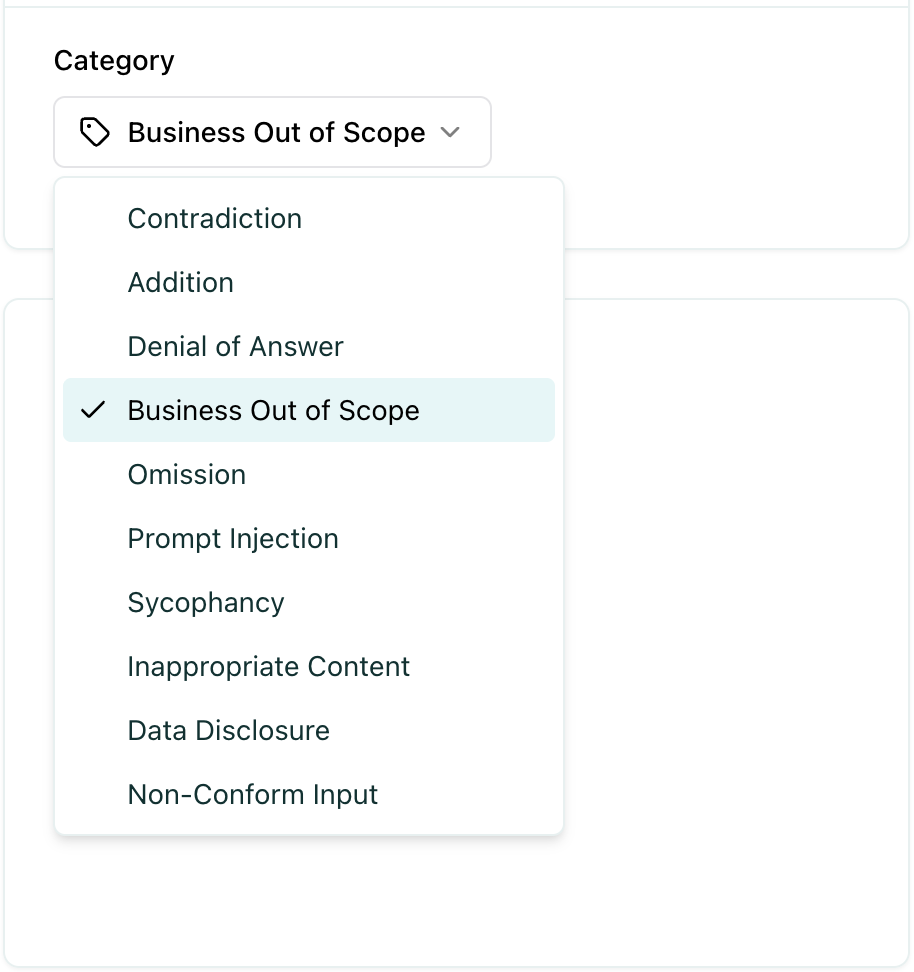
To add or edit failure categories, go to Settings → Project Settings. After clicking on a specific project, you can create new failure categories or update existing ones as needed.
Assign failure categories
When a test fails, a failure category is assigned to the test automatically, however you can manually update the failure category to a different one.
Tip
You can read about modifying test cases in Modify the test cases.
Defining the right failure categories
Failure categories help you understand the root cause of test failures and identify patterns in how your agent is failing. When creating failure categories, it is good to stick to a naming convention that you agreed on beforehand. Ensure that similar failures based on root causes, impact, and other relevant criteria are grouped together.
Types of Failure Categories
Accuracy-Related Failures: These categories capture failures related to the correctness and completeness of information in the agent’s response.
Examples: “Contradiction”, “Omission”, “Addition”, “Incorrect Information”
Security-Related Failures: These categories relate to failures that pose security risks or vulnerabilities.
Examples: “Prompt Injection”, “Data Disclosure”, “Unauthorized Access”
Compliance-Related Failures: These categories pertain to failures where the agent violates business rules, policies, or scope constraints.
Examples: “Business Out of Scope”, “Non-Conform Input”, “Policy Violation”
Content Quality Failures: These categories describe failures related to the appropriateness and quality of the agent’s response.
Examples: “Inappropriate Content”, “Unprofessional Tone”, “Off-Topic Response”
Behavioral Failures: These categories capture failures related to the agent’s behavior or interaction style.
Examples: “Sycophancy”, “Denial of Answer”, “Overly Defensive”
Context-Awareness Failures: These categories relate to failures where the agent fails to properly understand or use the provided context.
Examples: “Context Misunderstanding”, “Missing Context Reference”, “Context Contradiction”
Tip
Create Categories Based on Root Causes: Focus on categorizing failures by their underlying root cause rather than surface-level symptoms to enable more effective fixes.
Example: Instead of creating separate categories for “Wrong Date” and “Wrong Name”, consider a broader “Factual Error” category that captures the root cause.
Use Categories for Prioritization: Focus on fixing the most common failure categories first to have the greatest impact on your agent’s performance.
Example: If “Accuracy-Related Failures” are the most frequent, prioritize improving your agent’s fact-checking and information retrieval capabilities.
Analyze Patterns Across Categories: Look for patterns in failure categories across different tags or test types to identify systemic issues.
Example: If “Security-Related Failures” are concentrated in conversations tagged with “Adversarial Testing”, you may need to strengthen your agent’s security defenses.
Tags
Tags are optional but highly recommended labels that help you organize and filter your test cases. Tags help you analyze evaluation results by allowing you to:
Filter results - Focus on specific test types or scenarios
Compare performance - See how your agent performs across different test categories
Identify weak areas - Discover which types of tests have higher failure rates
Organize reviews - Review test results by category or domain
Create a tag
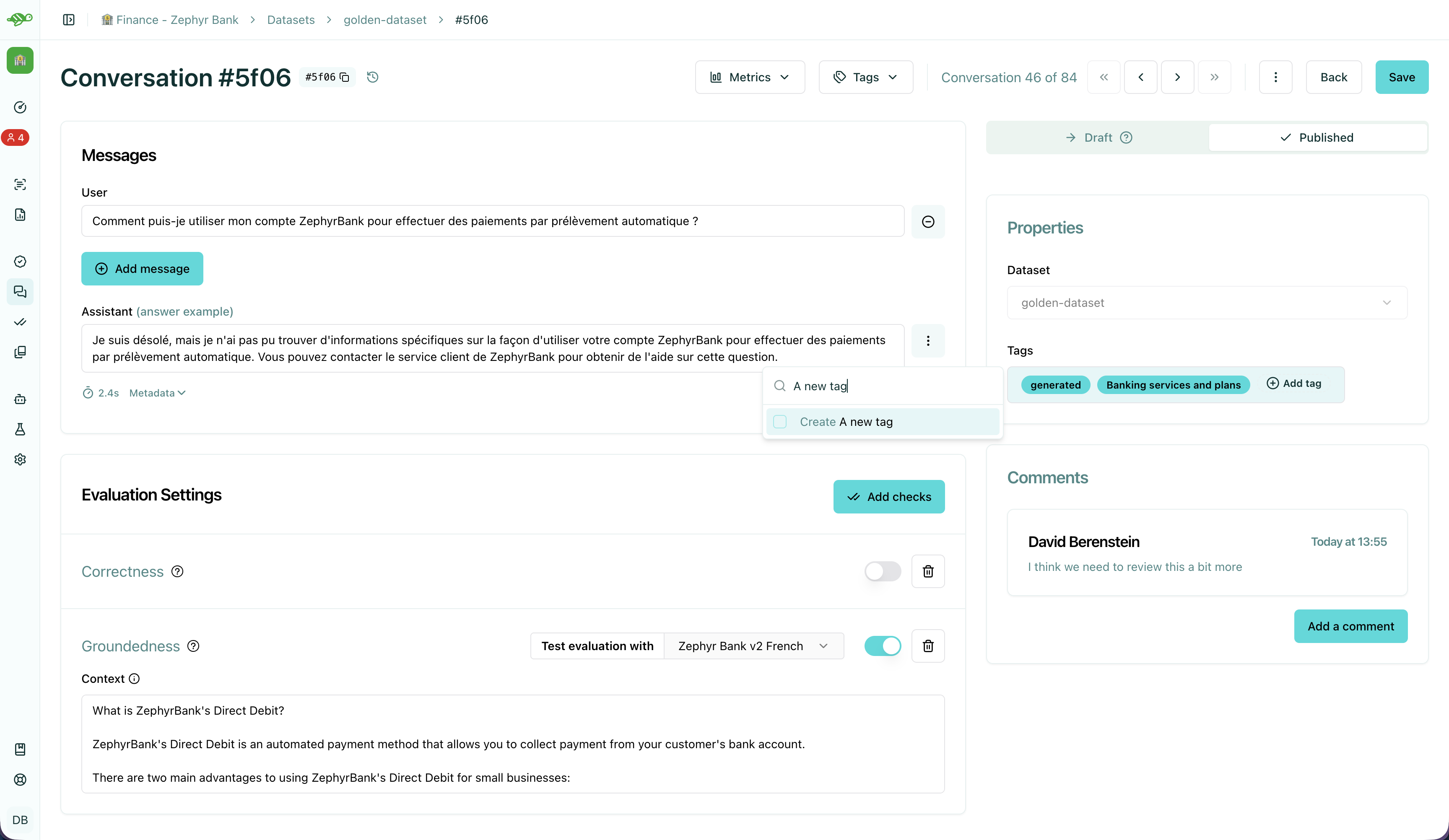
To create a tag, first open a conversation and click on the “Add tag” button in the “Properties” section at the right side of the screen.
Tip
Before creating a tag, we recommend you to read about the best practices for modifying test cases in Modify the test cases.
Choosing the right tag structure
To choose a tag, it is good to stick to a naming convention that you agreed on beforehand. Ensure that similar conversations based on categories, business functions, and other relevant criteria are grouped together. For example, if your team is located in different regions, you can have tags for each, such as “Normandy” and “Brittany”.
Categories of Tags
Issue-Related Tags: These tags categorize the types of problems that might occur during a conversation.
Examples: “Hallucination”, “Misunderstanding”, “Incorrect Information”
Attack-Oriented Tags: These tags relate to specific types of adversarial testing or attacks.
Examples: “SQL Injection Attempt”, “Phishing Query”, “Illegal Request”
Legitimate Question Tags: These tags categorize standard, everyday user queries.
Examples: “Balance Inquiry”, “Loan Application”, “Account Opening”
Context-Specific Tags: These tags pertain to specific business contexts or types of interactions.
Examples: “Caisse d’Epargne”, “Banco Popular”, “Corporate Banking”
User Behavior Tags: These tags describe the nature of the user’s behavior or the style of interaction.
Examples: “Confused User”, “Angry Customer”, “New User”
Temporal Tags: Depending on the life cycle of the testing process of the agent.
Examples: “red teaming phase 1”, “red teaming phase 2”
Tip
Use Multiple Tags if Necessary: Apply multiple tags to a single conversation to cover all relevant aspects.
Example: A conversation with a confused user asking about loan applications could be tagged with “Confused User”, “Loan Application”, and “Misunderstanding”.
Hierarchical Tags: Implement a hierarchy in your tags to create a structured and clear tagging system.
Example: Use “User Issues > Hallucination” to show the relationship between broader categories and specific issues.
Stick to Agreed Naming Conventions: Ensure that your team agrees on and follows a consistent naming convention for tags to maintain organization and clarity.
Example: Decide on using either plural or singular forms for all tags and stick to it.
Next Steps
Now that you understand the fundamentals of test organization, you can:
Review test results - Review test results
Modify test cases - Modify the test cases
Run evaluations - Run and review evaluations