

Review test results
This section guides you through the business workflow for reviewing test results. This workflow is designed for business users who need to review evaluation results, understand failures, and determine the appropriate actions to take.
Starting reviews
Section titled “Starting reviews”There are two main ways to review test results:
- From an evaluation run
- From an assigned task
From an evaluation run
Section titled “From an evaluation run”When reviewing a failure directly from a test execution (not from a task), follow these steps:
- Review a fail after a test execution - After a test execution, review the failure details
- Determine the appropriate action - Based on your review, decide which of the following scenarios applies:
graph LR
    A[Review Failure] --> B{Agent Answer<br/>Correct?}
    B -->|No| C[<a href="/hub/ui/annotate/task-management" target="_self">Open Task<br/>Assign to Developer<br/>or KB Manager</a>]
    B -->|Yes| F{Rewrite Now?}
    B -->|Don't Know| E[<a href="/hub/ui/annotate/task-management" target="_self">Put in Draft<br/>Open Task<br/>Assign to Domain Expert</a>]
    F -->|Yes| G{Can Answer<br/>Questions?}
    F -->|No| H[<a href="/hub/ui/annotate/task-management" target="_self">Draft Test Case<br/>Create Task<br/>Assign to PO</a>]
    G -->|Yes| I[<a href="/hub/ui/annotate/modify-test-cases" target="_self">Rewrite Test<br/>Retest<br/>Save</a>]
    G -->|No| J{Has Value?}
    J -->|No| K[Remove Test]
    J -->|Yes| H
If the agent is incorrect, the test is well written
Section titled “If the agent is incorrect, the test is well written”If the agent is incorrect and the test is correctly identifying the issue:
- Open a task and assign the agent developer or the KB manager
- Navigate to the “Distribute tasks” workflow Task management
- Create a task with a clear description of what needs to be fixed
If the agent is correct, the test should be rewritten
Section titled “If the agent is correct, the test should be rewritten”If the agent is correct and the test was too strict, you need to rewrite the test. You have the following options:
Option 1: You want to do it later
- Draft the test case - Mark the test case as draft to prevent it from being used in evaluations
- Open a task where you can track that this test case needs to be modified
- Assign the product owner to the task
- Navigate to the “Distribute tasks” workflow Task management
Option 2: You are able to answer at least one of these questions:
- Is there any minimum information the agent must not omit (e.g., a number, a fact)?
- Is there any block of information the agent must not go beyond (a page of a website, a section of a document)?
- Is there any information you do not want to appear in the agent’s answer?
If you can answer at least one of these questions:
-
Go to the linked test case in the dataset
-
Rewrite the test requirement:
- If question 1 is true: Enable correctness check by putting the minimum info as reference
- If question 2 is true: Enable groundedness check and put the block of info as context
- If question 3 is true: Write a negative rule (“the agent should not…”) in a conformity check
-
Retest various times until the result is always PASS (regenerate a agent answer, and retest)
-
Save the changes
-
If the test case was in draft, undraft it
-
You can also set the task as closed (if applicable)
Option 3: The test does not have value
- Remove it from the dataset
If you don’t know, there needs to be a discussion
Section titled “If you don’t know, there needs to be a discussion”If you don’t know if the agent answers correctly or not and there needs to be a discussion:
- Put in draft - Mark the test case as draft to prevent it from being used in evaluations
- Open a task and assign the domain expert
- Navigate to the “Distribute tasks” workflow Task management
- Create a task with your questions and concerns, then assign it to the domain expert who can make this determination
From an assigned task
Section titled “From an assigned task”When reviewing a task that has been assigned to you, follow these steps:
- Open the task - Open the task that has been assigned to you
- Read the failure details - Review the description, result, and explanation for the failure
- Determine the appropriate action - Based on your review, decide which of the following scenarios applies:
graph LR
    B[Review Failure] --> C{Agent Answer<br/>Correct?}
    C -->|No| D[<a href="/hub/ui/annotate/task-management" target="_self">Assign to Developer</a>]
    C -->|Yes| E[<a href="/hub/ui/annotate/task-management" target="_self">Update Task Description<br/>Assign to Product Owner</a>]
    C -->|Don't Know| F[<a href="/hub/ui/annotate/task-management" target="_self">Update Task Description<br/>Assign to Expert or PO</a>]
If the agent is incorrect, the test is well written
Section titled “If the agent is incorrect, the test is well written”- Assign the task to the developer who should correct the test
- Navigate to the “Distribute tasks” workflow Task management
- Reassign the task to the appropriate developer with a clear description of what needs to be fixed
If the agent is correct, the test should be rewritten
Section titled “If the agent is correct, the test should be rewritten”If the agent answers correctly in reality and the test was too strict:
-
Provide the reason why the agent answer is ok, in the description of the task
-
Answer at least one of these questions to help guide the test rewrite:
- Is there any minimum information the agent must not omit (e.g., a number, a fact)?
- Is there any block of information the agent must not go beyond (a page of a website, a section of a document)?
- Is there any information you do not want to appear in the agent’s answer?
-
Assign the product owner so that he or she can rewrite the test based on your input
- Navigate to the “Distribute tasks” workflow Task management
- Update the task description with your answer and reassign it to the product owner
If you don’t know if the agent answers correctly or not. There needs to be a discussion
Section titled “If you don’t know if the agent answers correctly or not. There needs to be a discussion”If you don’t know if the agent answers correctly or not and there needs to be a discussion:
- Provide the reason why you don’t know and why it needs to be discussed
- Assign the right person with the knowledge or re-assign the product owner
- Navigate to the “Distribute tasks” workflow Task management
- Update the task with your questions and concerns, then reassign it to the appropriate person
Interpreting test results
Section titled “Interpreting test results”Check pass/fail
Section titled “Check pass/fail”When reviewing a test case, the first thing to check is whether the test case passed or failed. By opening the test case, you can see the metrics along with the failure category and tags on the right side of the screen.
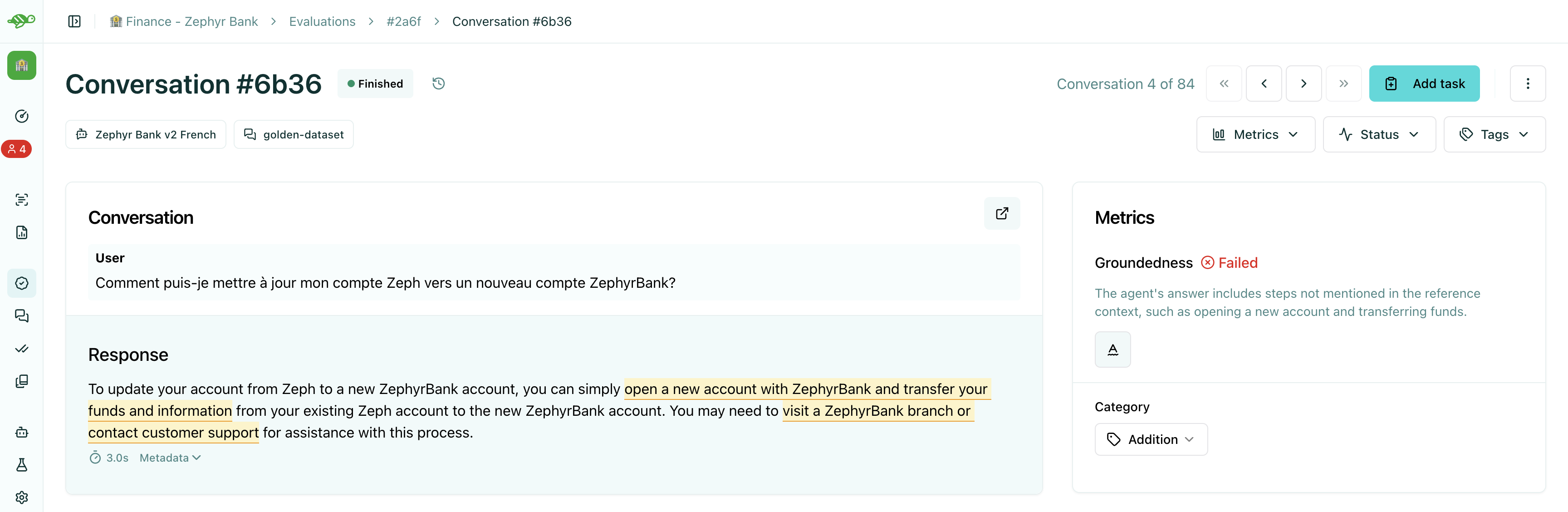
PASS:
- The test case met all the evaluation criteria (checks)
- All checks that were enabled on the test case passed
- The agent’s response was acceptable according to the validation rules
FAIL:
- The test case did not meet one or more evaluation criteria
- At least one check that was enabled on the test case failed
To understand why a test case failed, you need to review the specific checks that were applied.
Check failure reason
Section titled “Check failure reason”To understand why a test passed or failed, you need to review the explanation for each check and understand the failure categories.
Read the explanation for each check
Section titled “Read the explanation for each check”Each check provides an explanation of why it passed or failed. This explanation helps you understand:
- What the check was evaluating
- What criteria were applied
- Why the test case passed or failed
- What specific aspects of the agent’s response caused the result
Check failure category
Section titled “Check failure category”When a test fails, it is categorized based on the type of failure. Understanding these categories helps you:
- Identify patterns in failures
- Prioritize which issues to address first
- Assign tasks to the right team members
Common failure categories:
- Hallucination - The agent generated information not present in the context
- Omission - The agent failed to include required information
- Conformity violation - The agent did not follow business rules or constraints
- Groundedness issue - The agent’s answer contains information not grounded in the provided context
- Metadata mismatch - The agent’s metadata does not match expected values
- String matching failure - Required keywords or phrases are missing
Review the flow of the conversation
Section titled “Review the flow of the conversation”Understanding the conversation flow helps you assess whether the test case structure is appropriate and whether the agent’s response makes sense in context.
When reviewing the conversation flow, consider:
- Whether the conversation structure makes sense
- Whether the user messages are clear and unambiguous
- Whether the conversation history provides necessary context
- Whether the test case accurately represents the scenario you want to test
Conversation structure
Section titled “Conversation structure”A conversation, or test case, is composed of a sequence of messages between the user and the assistant, alternating between each role. When designing your test cases, you can provide conversation history by adding multiple turns (multi-turn), but the conversation should always end with a user message. The agent’s next assistant completion will be generated and evaluated at test case time.
Simple conversation
Section titled “Simple conversation”In the simplest scenario, a conversation consists of a single message from the user. For example:
User: Hello, which language is your open-source library written in?
Multi-turn conversation
Section titled “Multi-turn conversation”To test multi-turn capabilities or provide more context, you can add several alternating messages. For instance:
User: Hello, I wanted to have more information about your open-source library.
Assistant: Hello! I’m happy to help you learn more about our library. What would you like to know?
User: Which language is it written in?
You can add as many turns as needed, but always ensure the conversation ends with a user message, since the assistant’s reply will be evaluated at runtime.
Conversation Answer Examples
Section titled “Conversation Answer Examples”You can also provide an “answer example” for each test case. This answer example is not used during evaluation runs, but helps when annotating the dataset or validating your evaluation criteria. For example, you might want to:
- Import answer examples together with conversations by providing a
demo_outputfield in your dataset. - Generate the agent’s answer by replacing the assistant message directly in the interface.
- Write your own answer example to check specific behaviors or validation rules.
If you do not provide an answer example, the Hub will automatically use the assistant reply generated during the first evaluation run as the default example.
Conversation metadata
Section titled “Conversation metadata”The conversation metadata provides additional information about the agent’s response, which a developer decided to pass along with the answer, such as:
- Tool calls that were made
- System flags or status indicators
- Additional context or structured data
- Any other information the agent includes in its response
Reviewing metadata helps you understand:
- What actions the agent took during the conversation
- Whether the agent followed expected workflows
- Whether system-level requirements were met
- Whether the response structure matches expectations
For more information about metadata checks and other check types, see Overview.
Best practices
Section titled “Best practices”- Review thoroughly - Take time to understand all aspects of the test result before making a decision
- Document your findings - Add comments to tasks to help others understand your review
- Use appropriate actions - Close tasks when results are correct, assign modification work when changes are needed
- Collaborate effectively - Work with product owners and other team members to ensure test cases are accurate
- Maintain quality - Only close tasks when you’re confident the test results are correct
Next steps
Section titled “Next steps”Now that you understand how to review test results, you can:
- Modify test cases - Learn how to refine test cases and checks Modify test cases
- Distribute tasks - Create and manage tasks to organize review work Task management