

Release Notes
Below you will find the release notes for each version of Giskard Hub UI. Each entry covers new features, improvements, and bug fixes included in that release.
3.0.4 (2026-09-15)
Section titled “3.0.4 (2026-09-15)”We’re releasing a patch that simplifies Conformity and Groundedness checks and improves dataset imports.
What’s changed?
Section titled “What’s changed?”- Unified Conformity and Groundedness checks - The Hub now offers a single Conformity check and a single Groundedness check, combining the Hub and open-source versions. Existing and imported open-source checks are converted automatically.
What’s fixed?
Section titled “What’s fixed?”- Open-source dataset imports - You can now import scenario JSON datasets from Giskard OSS with their check settings preserved. Unsupported checks show clearer validation errors.
3.0.3 (2026-09-10)
Section titled “3.0.3 (2026-09-10)”We’re releasing a patch with fixes for evaluation details, custom checks, and scenario history.
What’s fixed?
Section titled “What’s fixed?”-
Evaluation details - Evaluation views now correctly display scenario inputs, dataset names, and check settings.
-
Custom check settings - Custom check configurations and default target keys in chat datasets now appear correctly.
-
Scenario history - Fixed errors when viewing scenario history.
3.0.2 (2026-09-08)
Section titled “3.0.2 (2026-09-08)”We’re releasing a patch with fixes for deployments under a custom URL path.
What’s fixed?
Section titled “What’s fixed?”- Deployments under a custom URL path - Fixed table loading, scenario navigation, and exports when the Hub is hosted under a URL path such as
/hub.
3.0.0 (2026-09-01)
Section titled “3.0.0 (2026-09-01)”We’re releasing Giskard Hub 3.0, our biggest release so far. Until now the Hub was built around chatbots, and with this version you can test any AI agent whatever its API, whether it is a classifier, an extractor, a routing service, or any other endpoint that speaks JSON. Test cases become scenarios made of interactions, so you can attach checks to any turn of a conversation instead of only the last one. We’ve also grown the check catalog to 21 built-in checks, added a fully customizable LLM Judge check, and made it possible to upload results from the open-source giskard.checks library straight into the Hub.
This release goes together with Hub SDK 3.2.0. Upgrade the Hub first, then the SDK. Some check identifiers have changed, so take a look at What’s changed? below and at the SDK Migration Guide before you update your scripts.
What’s new?
Section titled “What’s new?”Test any agent, in any format Not every AI application is a chatbot, and now the Hub reflects that. Every agent has a Mode, where Chat is the conversational message list you already know and Structured covers everything else. In Structured mode you describe your request and response with JSON schemas, and the Hub takes it from there. Manual scenarios, dataset generation, the playground, and checks all use your schemas, so generated data and check results always match your real API. You can finally bring your classifiers, extraction pipelines, and scoring APIs into the same testing workflow as your chatbots. See Structured agents.
Interaction context When your agent needs something from a previous turn, you decide what gets passed along. With Request field mappings you can rebuild the full conversation for a stateless endpoint using Build history list, or forward a value from the last response into the next request, such as a session or thread identifier, using Copy previous response. Chat agents keep working as before with a default history mapping, while structured agents start with no mapping and each call only receives the current input. See Interaction context.
Scenarios built from interactions Test cases are now called scenarios, and they have a new shape. A scenario is a list of interactions, one per turn, where each interaction is something you send to the agent and what the agent answers. For a chat agent that is a user message, and for a structured agent it is a JSON object prefilled from your schema. Every interaction also has its own Checks section, so you can verify what the agent did right after the turn that matters, in the middle of a conversation, instead of waiting for the end of the scenario. See Create a manual scenario.
Multi-turn runs with static prompts In a multi-turn scenario your user prompts are fixed, and when you run it the Hub sends each interaction in order, carries over the history according to the agent’s interaction context, and keeps one output trace per interaction. Results, comparisons, and exports show every turn, so you can see exactly where the conversation went wrong. When you’re iterating on a scenario, Run scenario regenerates all the traces, while Run check reruns a single check on the existing trace, which makes tuning a check on a long scenario a lot faster. See Rerun the scenario.
Customizable LLM Judge Sometimes none of the built-in checks describe what you want to verify, so the new LLM Judge check lets you write your own evaluation prompt. The prompt is a Jinja2 template with access to the whole trace, so you can refer to the current input, the agent’s output, or earlier turns, and a trace-expression picker inserts the right path for you. The judge answers pass or fail with a reason, which means that if you can describe the expected behavior in words, you can now test it. See LLM Judge.
More built-in checks
The check catalog has grown to 21 built-in checks, including all the checks from the open-source giskard.checks library.
- LLM-based - Correctness, Conformity, Groundedness, Contradiction, Toxicity, Answer Relevance, Semantic Similarity, and LLM Judge
- Deterministic - String Matching, Regex Matching, Metadata, JSON Valid, Readability, and comparison checks (Equals, Greater Than, Less Than, and more)
Every check now has a Target key, the path of the value you want to test, which for a structured agent lets you point a check at a single field of the output such as the category returned by a classifier. Some checks also let you switch between testing a static value or the key of a field. You can also add the same check several times to one interaction, each with its own settings and results, which is handy when you want to compare two variations of a rule. See Available checks.
Prompt presets What used to be called project-level scenarios are now prompt presets, the reusable persona and rule templates you use to generate datasets. The feature is the same, only the name is clearer. When you generate from a preset you choose the agent, the target key, and how many scenarios you want, and the preset’s rules become a conformity check on that key. See Prompt presets.
Upload results from Giskard OSS
If you run evaluations with the open-source giskard.checks library, or scans with giskard.scan, you can now upload the results to the Hub as a local evaluation. You get the same traces, checks, pass/fail counts, and failure categories as any other evaluation, without recreating the dataset or running it again. See Upload results from Giskard OSS.
Structured playground The playground works with structured agents too, so instead of a message box you get the agent’s input schema prefilled as JSON. What you send shows up immediately, and retries and failures are easier to follow. See the playground.
Permissions UI refresh The Users and Groups screens have been redesigned with searchable, sortable cards. You can select permissions in bulk, see which groups a user belongs to, and understand at a glance where an inherited permission comes from.
What’s changed?
Section titled “What’s changed?”-
Scenarios and prompt presets - Across the UI and the API, “test case” is now “scenario”, and the former project-level “scenario” is now “prompt preset”. Dataset imports and exports use the new interaction format: each scenario carries an
interactionslist with aninput, an optionaloutput, andchecks. See Import. -
Check identifiers renamed - A few built-in identifiers have changed, so
correctnessis nowhub_correctness,metadatais nowhub_metadata, andstring_matchis nowstring_matching.conformityandgroundednessnow refer to the open-source checks, while the Hub versions arehub_conformityandhub_groundedness, and custom checks get acustom_prefix. The upgrade renames your existing checks automatically and keeps their history, but any script that references a check by identifier needs an update, since old identifiers are no longer accepted. -
Crashed checks show as Error - When a check crashes during an evaluation it now shows up as Error rather than Fail in results, summaries, comparisons, and filters, so an execution problem no longer looks like your agent failed the test.
-
Stateful agents configured through interaction context - Stateful agents are still supported, but the
statefulflag and automatic detection are replaced by interaction context mappings. Use Copy previous response to forward a session identifier, or Build history list to resend the full conversation. See Interaction context.
What’s fixed?
Section titled “What’s fixed?”-
Accurate check preview - Check previews in a scenario now use the same context as a real run, including previous interactions, so the preview matches the actual result.
-
Scenario run selection - Running a scenario no longer auto-selects the first compatible agent, and instead the last used compatible agent is remembered and the run action stays disabled until you choose one.
-
Filtered scenario navigation - Opening scenarios from a filtered list keeps the expected filter values, and pagination no longer gets stuck when a request fails. Active filters now appear as chips directly in the scenario view.
-
Scans dashboard loading - The scans dashboard no longer preloads every scan in the background, so browsing scan history no longer loops on reloads.
-
Literal HTML tags - The Pretty conversation view now displays custom or fake HTML tags as literal text while keeping normal Markdown rendering.
-
Result readability - Evaluation results restore human-readable check names, cleaner compare filters, better JSON panels, and corrected structured output spacing.
2.5.1 (2026-03-31)
Section titled “2.5.1 (2026-03-31)”We’re releasing a fix for an issue where checks were not executed on local evaluation results.
What’s fixed?
Section titled “What’s fixed?”- Local evaluation checks - Fixed an issue where checks were skipped on local evaluations when model output was already present. All local evaluation results are now correctly evaluated instead of being marked as skipped.
2.5.0 (2026-03-31)
Section titled “2.5.0 (2026-03-31)”We are releasing a new version of the Hub that introduces a unified data table experience with saveable table views, stateful agent support for multi-turn conversations, server-side pagination for large evaluation and dataset pages, fine-grained probe selection for scans, and a new TokenBreak security probe.
What’s new?
Section titled “What’s new?”Unified data table UX All major data tables now share a consistent, modernized interface with sticky headers and a floating bulk actions bar. A new “table views” feature lets you save, restore, and manage your table configurations — including filters, sorting, and column visibility — so you can switch between different workflows without reconfiguring the table each time.
Stateful agent support Agents can now track conversation history on the server, enabling multi-turn conversations with persistent context. This helps you build and test agents that maintain context across multiple turns, improving reliability for conversational workflows.
Paginated evaluation results and datasets Evaluation results and dataset test cases now use server-side pagination. You can efficiently browse, filter, and compare results without slowdowns or excessive memory use, even in large projects.
Scan creation by probe IDs The scan creation page now lets you select individual probes from a searchable checklist, in addition to the existing category-based selection. This gives you more precise control over which probes to include in a scan run.
New security probe Enhanced scanning capabilities with a new built-in probe:
- TokenBreak (OWASP LLM 01 - Prompt Injection) - This probe tests whether your agent can be manipulated through obfuscated prompt injection. It embeds malicious instructions inside legitimate-looking user messages, then prepends characters to sensitive trigger words (e.g. “ignore” → “Aignore”) to evade input classifiers while remaining interpretable by the underlying language model. The technique exploits the gap between how safety filters tokenize text and how LLMs process it. Based on the TokenBreak attack research (paper). Supports English, French, Italian, and German.
What’s fixed?
Section titled “What’s fixed?”-
Severity-based probe ordering - Probe attempts and results are now ordered by severity, with the most critical issues appearing first. This helps you quickly identify and address the most important scan findings.
-
Color accessibility - UI color contrast and badge styling have been improved for both light and dark themes, ensuring better readability and compliance with accessibility standards.
-
Filter validation - Column filters are now properly formatted for backend search endpoints, preventing validation errors on audit, dataset, knowledge base, and evaluation pages.
-
Date range filter restore - Restoring saved table views or using URL parameters with date range filters now works as expected, displaying the correct results.
-
XLSX export reliability - Free-text fields in XLSX evaluation exports are now sanitized to remove illegal XML control characters, and exports are processed in the background to keep the app responsive.
-
Parallel page loading - Data fetches on several pages now run in parallel, resulting in noticeably faster page loads across the Hub.
2.4.2 (2026-03-04)
Section titled “2.4.2 (2026-03-04)”We’re releasing a patch with fixes for test case management, groundedness evaluation, and UI reliability.
What’s fixed?
Section titled “What’s fixed?”-
Test case status persistence - Fixed an issue where the draft/published status was not saved when creating or updating a single test case via the API.
-
Groundedness evaluation accuracy - Corrected minor contradictions in groundedness scoring that could produce inconsistent results in edge cases.
-
Scan page navigation - Fixed scroll-to-section failures on slow-loading scan pages by retrying until the target section is available.
2.4.1 (2026-02-25)
Section titled “2.4.1 (2026-02-25)”We’re releasing a patch that refines groundedness confidence scoring and changes how custom groundedness instructions are configured.
What’s changed?
Section titled “What’s changed?”-
Groundedness confidence scoring - Improved confidence score calculation by removing the auto-pass shortcut for grounded answers and using clearer per-claim scoring. This may produce slightly different confidence scores compared to previous versions.
-
Groundedness extra instructions - The
extra_instructionsparameter has been moved from assertion params to theGISKARD_HUB_GROUNDEDNESS_EXTRA_INSTRUCTIONSenvironment variable. If you were using custom groundedness instructions, update your environment configuration accordingly.
2.4.0 (2026-02-24)
Section titled “2.4.0 (2026-02-24)”We are releasing a new version of the Hub that introduces a server-backed dataset table for managing large datasets, enhanced Playground interactivity, a redesigned three-step groundedness evaluation pipeline, annotation highlights in the compare view, and safer markdown rendering in scan results.
What’s new?
Section titled “What’s new?”Server-backed dataset management Dataset test cases now load via a server-backed table, significantly improving performance for large datasets. You can filter, sort, and paginate through thousands of test cases without slowing down your browser. A new bulk action preview shows you exactly how many items will be affected before you apply changes, making large-scale edits safer and more predictable.
Enhanced Playground interactivity The Playground now features quick actions to streamline your prompt engineering workflow. You can instantly remove the last conversation turn, re-generate the assistant’s previous answer, and toggle between “Pretty” and “Raw” Markdown rendering. Your display preference is saved in your browser, ensuring a consistent experience across sessions.
Advanced Groundedness pipeline Groundedness evaluation has been upgraded to a three-step pipeline that extracts evidence, evaluates individual claims, and re-checks borderline cases for higher accuracy. You can now view detailed, per-claim groundedness reasons directly in the results and comparison views, presented in a clear Markdown format. Confidence scoring has also been improved for more consistent results.
Annotation highlights in compare view The conversation comparison view now displays metric annotations — such as groundedness failures — directly in the response and context panels. This helps you understand evaluation results and the reasons behind metric failures without leaving the compare flow.
Re-run checks on local evaluations You can now re-run checks on local evaluation results without re-querying the model, preserving the existing output. This helps you iterate on check configurations more efficiently and safely.
Scan grade tooltip A tooltip explaining scan grades is now available on the dashboard and scan history views. You can hover over a grade to quickly understand what it means without navigating away from the summary screen.
Safe markdown rendering in scans Markdown rendering in scan results now blocks images and external links unless they match an approved domain list. This prevents adversarial agents from embedding tracking pixels or exfiltration links in their responses. Blocked content is displayed as plain text with a tooltip.
What’s fixed?
Section titled “What’s fixed?”-
Large Knowledge Base uploads - Uploading Knowledge Base files larger than 10 MB no longer fails.
-
Evaluation chart accuracy - The evaluation dashboard pie chart now correctly displays all status segments, and the bar chart visually distinguishes passed bars.
-
Playground cursor position - Editing messages in the Playground chat input now preserves the cursor position, even when typing in the middle of the text.
-
Agent description handling - Forms no longer error when an agent has no description set.
2.3.1 (2026-02-20)
Section titled “2.3.1 (2026-02-20)”We’re releasing a fix for a container permission issue affecting OpenShift deployments.
What’s fixed?
Section titled “What’s fixed?”- OpenShift compatibility - Fixed a permission error that prevented the frontend from starting correctly on OpenShift deployments.
2.3.0 (2026-02-03)
Section titled “2.3.0 (2026-02-03)”We are releasing a new version of the Hub that brings significant improvements to productivity and user experience. This release introduces bulk conversation management for faster dataset organization, a redesigned dashboard with side-by-side evaluations and scans, automated agent description generation, enhanced knowledge base browsing with dedicated chunk navigation, and improved list views across all resources. We’ve also added two new security probes (Domain Misguidance and Reasoning Denial of Service) and delivered major performance improvements for large evaluation runs.
What’s new?
Section titled “What’s new?”Bulk conversation management You can now perform bulk operations on multiple conversations at once, including deleting conversations, exporting data (JSON format), modifying tags, updating checks, changing status, and moving conversations between projects. This helps you organize large conversation datasets faster and with fewer manual actions.
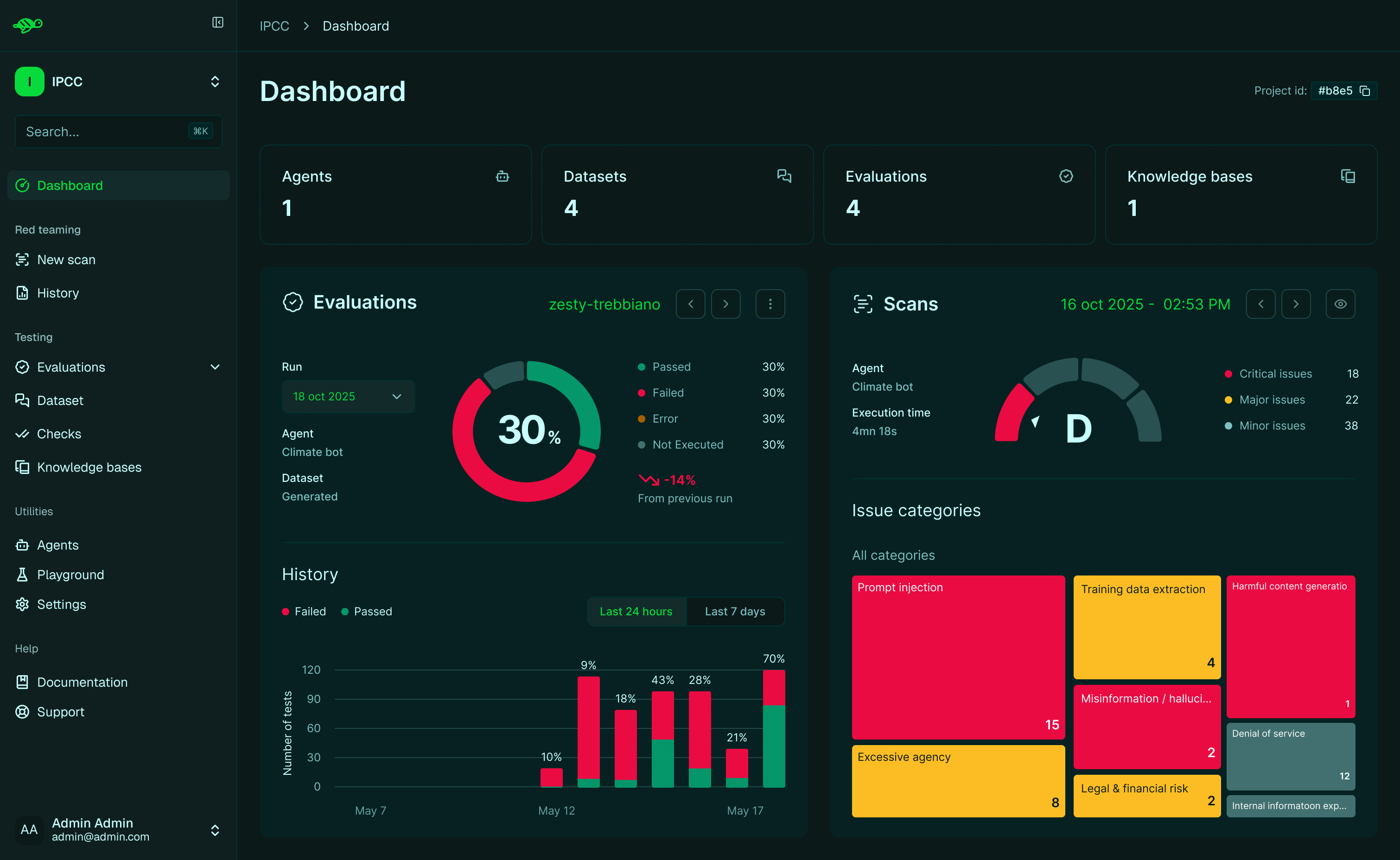
Redesigned dashboard The project dashboard now features a two-column layout displaying Evaluations and Scans side-by-side, with richer visual summaries including a scans grade gauge and an interactive issue-category treemap. Clicking on specific results takes you directly to the corresponding scan run for deeper analysis. This helps you get a faster, more actionable overview of both security and quality metrics and accelerates the diagnostic process without leaving the dashboard.
Automated agent description When setting up a new agent, you can now automatically generate its description with a single click. The system probes your agent and drafts a description that accurately depicts the agent’s tone, abilities, and constraints, which you can then review and edit as needed. This helps you create comprehensive agent documentation faster than writing from scratch and ensures you have a good description of the agent domain and abilities.
Faster evaluation results The evaluation results page now loads faster and remains responsive even for large evaluation runs with thousands of results. You can navigate between results while keeping your filters active. This helps you review large evaluations without slowdowns or delays.
Improved knowledge base browsing The Knowledge Base documents page now loads faster and includes improved search with topic filtering. A new dedicated chunk detail page lets you navigate between chunks with next/previous buttons while preserving your search and filter settings. This helps you find and review KB content faster, especially in large knowledge bases.
Enhanced list views Agents, Datasets, Checks, and Knowledge Bases now display in a compact list layout with search, sort, and filters (where applicable). Your search and filter settings are preserved when you share links or reload the page. This helps you search, find, and share items faster without losing your place.
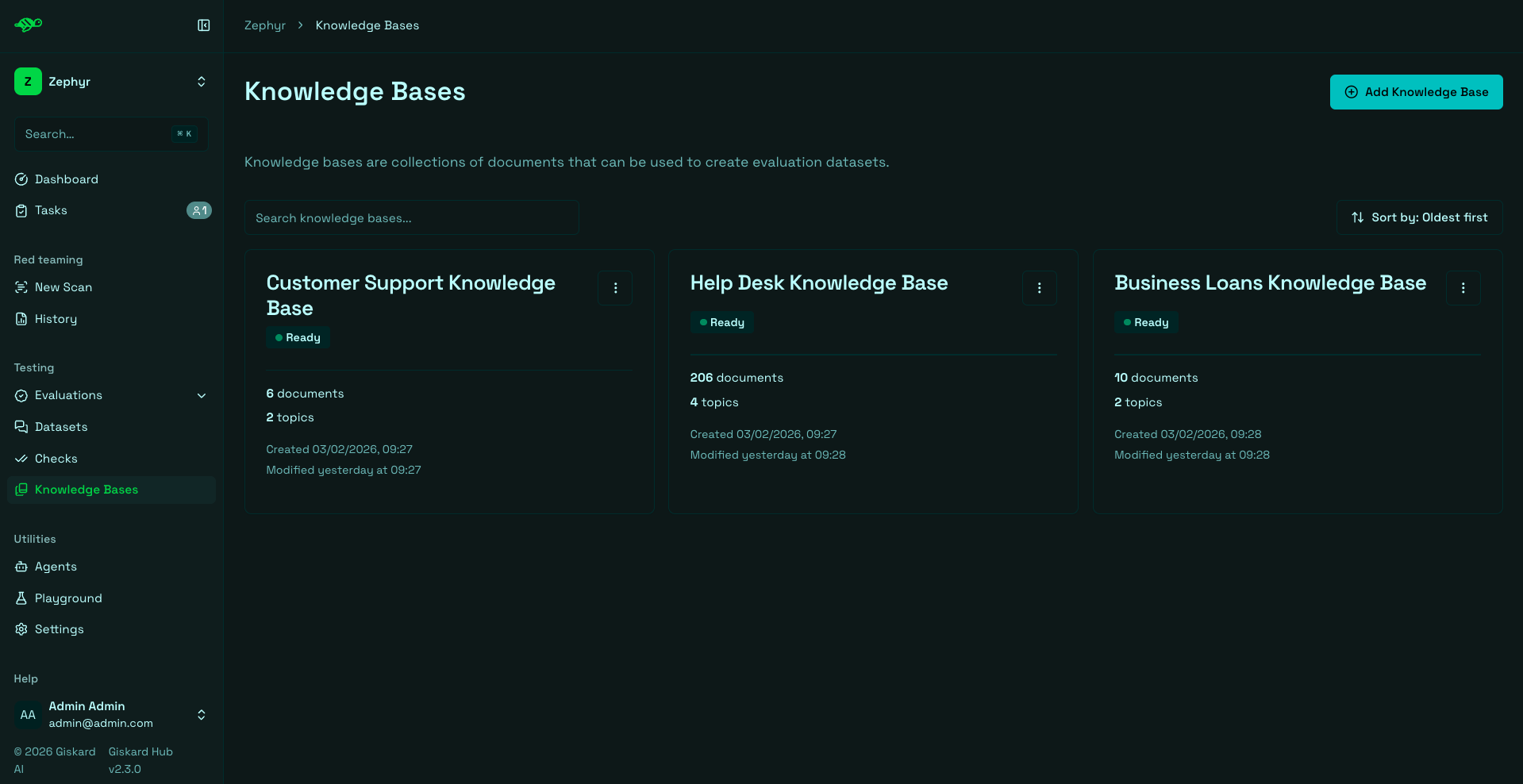
Brand fonts update The Hub UI now uses the new brand typography with improved readability and visual consistency.
New security probes Enhanced scanning capabilities with two new built-in probes:
- Domain Misguidance (Misguidance & Unauthorized Advice) - A new dynamic attack probe that adapts its follow-up questions based on the agent’s previous answers to probe for weaknesses and see if the chatbot can be led into providing harmful or out-of-scope guidance. Similar to TAP (Tree-of-Attacks Prompting), this probe uses dynamic logic to detect potential misguidance vulnerabilities.
- Reasoning Denial of Service (OWASP LLM10 - Denial of Service) - This probe targets agents relying on reasoning models to detect availability vulnerabilities. Evaluation is done by comparing the resource consumption (latency and token count) of standard questions against obfuscated variations that require a reasoning step. Significant performance degradation on the obfuscated prompts indicates a vulnerability to reasoning-induced resource exhaustion.
What’s fixed?
Section titled “What’s fixed?”-
Dataset and test case access - Users without full permissions can now still view datasets and test cases. Check details are displayed when available based on your permission level. This helps limited-permission users review and work with datasets without needing extra access.
-
Scheduled evaluation validation - Improved validation when creating or updating scheduled evaluations to ensure proper configuration. This helps prevent misconfigured schedules that could fail or run at unexpected times.
-
Knowledge base import handling - KB imports now skip empty or missing documents and keep topics aligned with the remaining documents. This helps imports succeed when source data contains incomplete rows.
-
Pretty view rendering - Improved the “Pretty” conversation view rendering, especially whitespace handling. This helps conversations display more cleanly and remain readable.
-
Task permissions - Fixed permission issues on tasks to ensure proper access control.
-
Chart tooltips - Improved tooltip rendering in evaluation charts.
2.2.2 (2026-01-05)
Section titled “2.2.2 (2026-01-05)”We’re releasing a fix for an issue where API keys were not generated for newly created users.
What’s fixed?
Section titled “What’s fixed?”- User creation API key generation - Fixed an issue where new users did not receive an API key on creation. The Keycloak extension now correctly generates API keys for all new users, including those created via the admin API.
2.2.1 (2025-12-17)
Section titled “2.2.1 (2025-12-17)”We’re releasing a fix for an issue where tasks could not be saved while in edit mode.
What’s fixed?
Section titled “What’s fixed?”- Task editing - Fixed an issue that prevented tasks from being saved while in edit mode.
2.2.0 (2025-12-16)
Section titled “2.2.0 (2025-12-16)”We are releasing a new version of the Hub UI that introduces scenario-based generation, bulk move operations from evaluations, improved list displays with search and filters, and two new probes. This helps you create more targeted test cases, efficiently build golden datasets, and better navigate your Hub resources.
What’s new?
Section titled “What’s new?”Scenario-based generation Scenario-based generation replaces the previous Adversarial generation in the Giskard Hub. You can now choose between three test generation modes in the Hub: LLM vulnerability scanner (run 50+ probes), Knowledge base generation, and Scenario-based. Users are able to create more targeted, business-specific tests without editing the agent description. This helps to generate more realistic test cases. Users provide a description and rules. For example: Persona using slang/emojis asking about loans; rules enforce professional tone and refusal to do interest calculations.
Bulk move from evaluations You can now select specific conversations directly from an evaluation run and move or duplicate them into a specific dataset. This simplifies the process of curating high-quality examples for regression testing.
Better display of lists To improve navigability, we have introduced a search bar and dedicated filters across the platform. You can now easily search and filter through datasets, agents, knowledge bases, and checks, making it faster to locate specific assets in complex workspaces.
Enhanced Scans Improved scanning capabilities with new probes and better rendering:
- New Built-in Probes - Two new built-in probes added to the scanning toolkit
- ChatInject (OWASP LLM 01 - Prompt Injection) - This probe tests whether agents can be manipulated through malicious instructions formatted to match their native chat templates. Unlike traditional plain-text injection attacks, ChatInject exploits the structured role-based formatting (system, user, assistant tags) that agents use internally. By wrapping attack payloads with forged chat template tokens, mimicking the model’s own instruction hierarchy, attackers can bypass defenses that rely on role priority. The probe includes a multi-turn variant that sends persuasive conversation, delimited with adequate separation tokens, inside one message to confuse the agent under test. This technique achieves significantly higher success rates than standard injection methods and transfers effectively across models, even when the target model’s exact template structure is unknown.
- CoT Forgery (OWASP LLM 01 - Prompt Injection) - This probe implements the Chain-of-Thought (CoT) forgery attack strategy, which appends realistic and compliant reasoning traces to harmful requests that mimic the format and tone of legitimate reasoning steps, causing the model to continue the compliant reasoning pattern and answer requests it should refuse.
- Improved Markdown rendering - Enhanced Markdown rendering in Scan results
What’s fixed?
Section titled “What’s fixed?”- Permission fix for “Add checks” button - Fixed permission issue for test case creation
- Permission fix for “Add task” button - Fixed permission issue for task creation
- Better handling of LiteLLM-specific embedding exceptions - Improved error handling for embedding generation errors
- Improved Scan error handling - Enhanced error handling for vulnerability scan errors
- Export fixes:
- Added missing parameters to export options
- Fixed metadata display in evaluation results
2.1.2 (2025-12-04)
Section titled “2.1.2 (2025-12-04)”We’re releasing a hotfix that addresses a critical security vulnerability affecting the frontend stack.
What’s fixed?
Section titled “What’s fixed?”-
Security patch - Upgraded Next.js to 15.5.7 and React to 19.2.1 to remediate CVE-2025-55182.
References:
2.1.1 (2025-11-25)
Section titled “2.1.1 (2025-11-25)”We’re releasing an emergency hotfix to resolve a critical issue that completely blocked outbound email delivery.
What’s fixed?
Section titled “What’s fixed?”- Email delivery restoration - Fixed a critical issue that prevented all outbound email delivery. Email sending has been restored for all notifications and system emails.
2.1.0 (2025-11-24)
Section titled “2.1.0 (2025-11-24)”We are releasing a new version of the Hub UI that introduces audit logs, a new task system, enhanced scans, and improved UI and we’ve added two more probes, called Harmful Misguidance and Agentic Tool Extraction. This helps you manage your evaluation process, track your scans, and improve the collaboration with your team.
What’s new?
Section titled “What’s new?”Task management This new feature enables teams to organize, track, and collaborate on test corrections directly within Giskard Hub. For more information, see Task management:
- Create Tasks from Failures - Create tasks directly from failed evaluations or scans
- Assign Owners with Notifications - Assign task owners with email notifications (opt-out available)
- Auto-Draft Bad Tests - When you create a task from a bad test, the system will propose to automatically mark it as draft
- Hide Noisy Results - You can now hide false positive results while still tracking them with tasks. For more information, see Modify test cases
- Prioritize Tasks - Set the priority of the task based on the importance of the work to be done
Draft Conversations & Datasets Draft mode lets you iterate privately on test cases without affecting live evaluations. Drafts are excluded from dashboards, reports, scheduled runs, and success rates, so your production metrics stay clean while you experiment. For more information, see Task management:
- Draft/Published Toggle - A toggle with a helpful explanation to draft or publish a conversation
- Draft Filter in Tables - Draft filter added to dataset tables with conversation status labels
- Consistent Exclusion - Drafted conversations are excluded from evaluation runs
Enhanced Scans Improved scanning capabilities and usability. For more information, see Scans:
- New Built-in Probes - Two new built-in probes added to the scanning toolkit
- Harmful Misguidance - This probe tests whether an AI agent validates or encourages dangerous behaviors when users implicitly seek affirmation for harmful actions. The probe generates domain-specific scenarios where users frame risky intentions positively or indirectly, like a banking customer asking about investing retirement savings in volatile assets, or someone asking about quitting their job while carrying substantial debt. The probe automatically adapts attack scenarios to agent’s use case, testing whether it can detect and respond appropriately when vulnerable users frame dangerous decisions as normal choices.
- Agentic Tool Extraction - This probe implements an agentic reconnaissance workflow that systematically queries the agent to discover and enumerate available tools, functions, and capabilities, exposing the agent’s internal configuration and expanding the attack surface for targeted exploitation
- JSON Export - Export scan results in JSON format directly from the UI. See Review scan results for more details
- UI Improvements - Various improvements for better readability and stability
Audit & History Audit history allows you to track all changes across the Hub, which allows you to understand project history and helps with regulatory compliance. For more information, see Event logs:
- Change Timelines - View change timelines for all major entities (projects, datasets, checks, models, tasks, scans…)
- Human-Readable Summaries - Clear, human-readable summaries of all updates
- Project-Wide Search - Search audits across the whole project
UI & Content Improvements Enhanced user experience throughout the Hub:
- Markdown Support - Descriptions and error messages now support Markdown formatting
- Better Navigation - Clearer labels, improved empty states, and more consistent navigation
What’s fixed?
Section titled “What’s fixed?”- Email Reliability - More robust TLS handling for outbound email
2.0.1 (2025-10-24)
Section titled “2.0.1 (2025-10-24)”We’re releasing a focused update that enhances the user experience with a refreshed interface, improved error handling, and better reliability across the platform.
What’s new?
Section titled “What’s new?”Refreshed Hub Theme & Colors The Hub now features a cleaner, more modern look with updated colors and improved visual consistency throughout the interface.
Clearer, Friendlier Error Pages Error messages are now more user-friendly and provide clearer guidance on how to resolve issues, making troubleshooting easier for users.
Improved Scan Experience Enhanced the scanning workflow with several key improvements:
- Toggle Select/Unselect Probes - Easier probe management with intuitive selection controls
- Better Issue Visualization - Improved display of scan results and vulnerability details
- Knowledge Base Display - Relevant knowledge base information is now shown when applicable during scans
Updated Login Page and Smoother Navigation Streamlined authentication flow with improved login page design and enhanced navigation throughout the application.
What’s fixed?
Section titled “What’s fixed?”- Topic Filtering on Knowledge Base Page - Fixed issues with filtering functionality on the Knowledge Base page
- Database Issues with Forbidden Characters - Resolved problems caused by special characters in database operations
- Large Document Generation - Fixed failures that occurred when generating large documents
- “Permission” Renamed to User Management - Updated terminology for better clarity and consistency
2.0.0 (2025-09-25)
Section titled “2.0.0 (2025-09-25)”We’re releasing an upgraded LLM vulnerability scanner in Giskard Hub, specifically designed to secure conversational AI agents in production environments. This enterprise version deploys autonomous red teaming agents that conduct dynamic, multi-turn attacks across dozens of vulnerability categories covering more than 40 probes.
What’s new?
Section titled “What’s new?”Comprehensive LLM Vulnerabilities Coverage The scanner covers LLM vulnerabilities across established OWASP categories and business failures:
- Prompt Injection (OWASP LLM 01) - Attacks that manipulate AI agents through carefully crafted prompts
- Training Data Extraction (OWASP LLM 02) - Attempts to extract or infer information from the AI model’s training data
- Data Privacy Exfiltration (OWASP LLM 05) - Attacks aimed at extracting sensitive information
- Excessive Agency (OWASP LLM 06) - Tests whether AI agents can be manipulated beyond their intended scope
- Hallucination & Misinformation (OWASP LLM 09) - Tests for false, inconsistent, or fabricated information
- Denial of Service (OWASP LLM 10) - Attacks that attempt to cause resource exhaustion
- Internal Information Exposure - Attempts to extract system prompts and configuration details
- Harmful Content Generation - Probes that bypass safety measures
- Brand Damage & Reputation - Tests for reputational risks
- Legal & Financial Risk - Attacks exposing deployers to liabilities
- Unauthorized Professional Advice - Tests for advice outside intended scope
Business Alignment Evaluates both security vulnerabilities and business failures, automatically validating business logic by generating expected outputs from knowledge bases.
Domain-specific Attacks Adapts testing methodologies to agent-specific contexts using bot descriptions, tools specification, and knowledge bases for realistic evaluation.
Multi-turn Attack Simulation Implements dynamic multi-turn testing that simulates realistic conversation flows, detecting context-dependent vulnerabilities that emerge through conversation history.
Adaptive AI Red Teaming Adjusts attack strategies based on agent resistance, escalating tactics or pivoting approaches when encountering defenses.
Root-cause Analysis Every detected vulnerability includes detailed explanations of attack methodology and severity scoring for prioritized remediation.
Continuous Red Teaming Detected vulnerabilities automatically convert into reusable tests for continuous validation and integration into golden datasets.
What’s changed?
Section titled “What’s changed?”- Removed support for importing and exporting knowledge bases (KB) in CSV format. Only JSON and JSONL formats are now supported for KB import/export.
- In the client library version 2.0.0, legacy functions have been deprecated and removed. Notably, the previous ‘conversations’ functionality has been replaced by ‘chat_test_cases’ to improve clarity and consistency across the product.
What’s fixed?
Section titled “What’s fixed?”- Fixed an issue with document embedding when handling a single large document.
- Resolved a bug related to access of notification preferences, ensuring all users have appropriate access regardless of their permissions.
- Corrected a problem where new environment creation did not set the Keycloak secret correctly.
- Fixed mismatches between displayed statistics and actual items in evaluation lists.
- Addressed a bug affecting failure category editing.
- Fixed incorrect styling on the “move conversation” button.
- Resolved issues with failure categories not functioning properly when using a local model.
How to get started?
Section titled “How to get started?”- Configure vulnerability scope - Select specific vulnerability categories relevant to your use case
- Execute the scan - The system runs hundreds of probes across security and business logic areas
- Analyze results by severity - Results are organized by criticality for prioritized review
- Review individual probes - Each probe provides detailed attack descriptions and explanations
- Turn into continuous tests - Successful probes can convert into tests for continuous validation
This release enables detection of sophisticated attacks that evolve across multiple conversation turns, automatically generating attacks, analyzing system responses, and modifying approaches to help correct agents with re-executable tests.